> For the complete documentation index, see [llms.txt](https://infosecgirls.gitbook.io/infosecgirls-training/llms.txt). Markdown versions of documentation pages are available by appending `.md` to page URLs; this page is available as [Markdown](https://infosecgirls.gitbook.io/infosecgirls-training/appsec/some-attack-scenarios/4-customiterator.md).

# Custom Iterator

1. In Mutillidae, go to the login page by clicking on "Login/Register" link.

   ![Login/Register](https://990422818-files.gitbook.io/~/files/v0/b/gitbook-legacy-files/o/assets%2F-LWGXF4oLcghA1GLq0CM%2F-LWHQt-EMiiOHTuosAKW%2F-LWHQwe3puPj-j7iEFzq%2F0e-mutillidae-add-to-blog%20\(1\).png?generation=1547571286313244\&alt=media)
2. Ensure Burp is in intercept mode.
3. Click on "Please register here" link.

<div align="left"><img src="https://990422818-files.gitbook.io/~/files/v0/b/gitbook-legacy-files/o/assets%2F-LWGXF4oLcghA1GLq0CM%2F-MJsDG3QYKDXgjxRYmNT%2F-MJsDUAWkOW0YLmQIDM-%2Fimage.png?alt=media&amp;token=0eb88405-acc6-43b3-8ba5-4495103b3563" alt=""></div>

4\. Intercept the request and send it to Intruder.

5\. In "Intruder" > "Positions" tab, mark all positions where *user input* is expected.

![](https://990422818-files.gitbook.io/~/files/v0/b/gitbook-legacy-files/o/assets%2F-LWGXF4oLcghA1GLq0CM%2F-MJsDG3QYKDXgjxRYmNT%2F-MJsDZIhktLE9k7EP_MC%2Fimage.png?alt=media\&token=ff96be5c-ffe4-459b-aaee-7d06cd0ab644)

6\. We intend to create unique users with user names like *user\_1*, *user\_2*, *user\_3*, and so on. Navigate to the `Payloads` sub-tab.

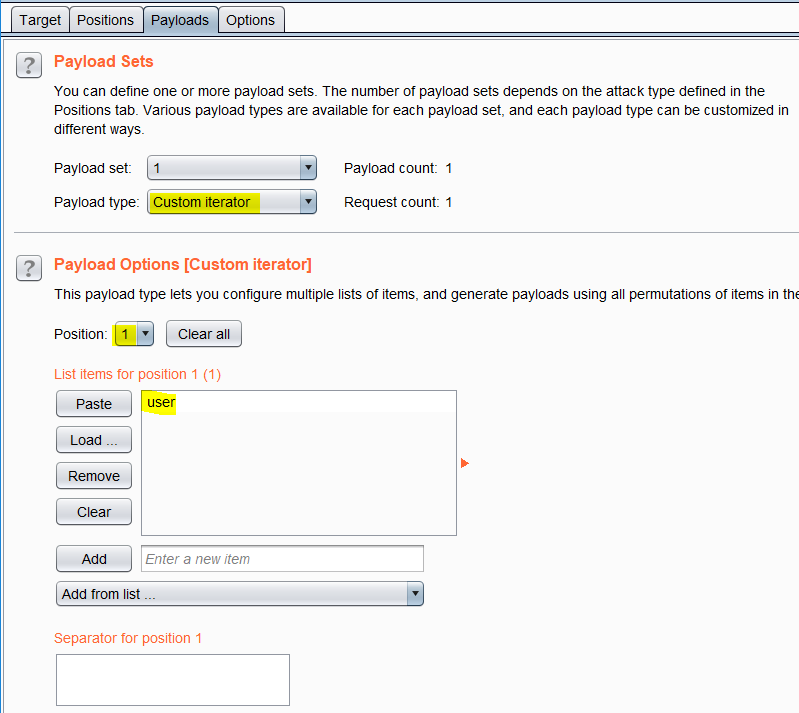
7\. Select the *payload set* corresponding to `username` field.

8\. Select *payload type* as `Custom Iterator`.

9\. Select `Position` as `1` and enter the static text **user** for *position 1*.

10\. Enter `_` (i.e., underscore) as the *separator* for position 1.

<div align="left"><img src="https://990422818-files.gitbook.io/~/files/v0/b/gitbook-legacy-files/o/assets%2F-LWGXF4oLcghA1GLq0CM%2F-MJsDG3QYKDXgjxRYmNT%2F-MJsDgONVS_01h3dBTUn%2Fimage.png?alt=media&amp;token=c158086a-f7b7-4369-87c3-c6ec9eb99b0b" alt=""></div>

![](https://990422818-files.gitbook.io/~/files/v0/b/gitbook-legacy-files/o/assets%2F-LWGXF4oLcghA1GLq0CM%2F-MJsLXtWsNvwgM2Xx3u1%2F-MJsLgvUGU-CsldussBs%2Fimage.png?alt=media\&token=68c3485e-d6c6-4653-8c22-a7b871f2f458)

11\. Select `Position` as `2` and load a list of distinct values, say, numbers starting from 1 till 20.

![](https://990422818-files.gitbook.io/~/files/v0/b/gitbook-legacy-files/o/assets%2F-LWGXF4oLcghA1GLq0CM%2F-MJsDG3QYKDXgjxRYmNT%2F-MJsEGr4y0I06rvyNKZn%2Fimage.png?alt=media\&token=d586836c-7518-4a0b-96bd-65e4ac9cafe4)

12\. Navigate to the `Options` sub-tab. In `Grep - Extract` section, click on `Add` button.

13\. Click on `Refetch response`, and highlight the text that needs to be extracted from each of the server responses.

![](https://990422818-files.gitbook.io/~/files/v0/b/gitbook-legacy-files/o/assets%2F-LWGXF4oLcghA1GLq0CM%2F-MJsE_QPN6sSOlZtPY9B%2F-MJsLUghvuN5F8OxKewr%2Fimage.png?alt=media\&token=f1fe26da-5517-45e2-a6ff-6af1fc8ea3e7)

14\. Start the attack.

![](https://990422818-files.gitbook.io/~/files/v0/b/gitbook-legacy-files/o/assets%2F-LWGXF4oLcghA1GLq0CM%2F-MJsDG3QYKDXgjxRYmNT%2F-MJsEMcgqDLzZK5CN6i1%2Fimage.png?alt=media\&token=13a1ccd6-b232-4a36-9d72-1c9d0064c29f)